Pipeline Intelligence Contact sales
Pipeline Intelligence Connect

Context before every call.
The AI-native contact center on your CRM.

The modern contact center blends AI and people — agents that answer routine calls, humans who handle what matters, and full account context on every handoff. Connect gives you browser voice, queues, IVR, tickets, and email on your CRM, with optional AI phone agents on your main number and live briefings when your team takes over.

Screen-pop

Briefed on ring

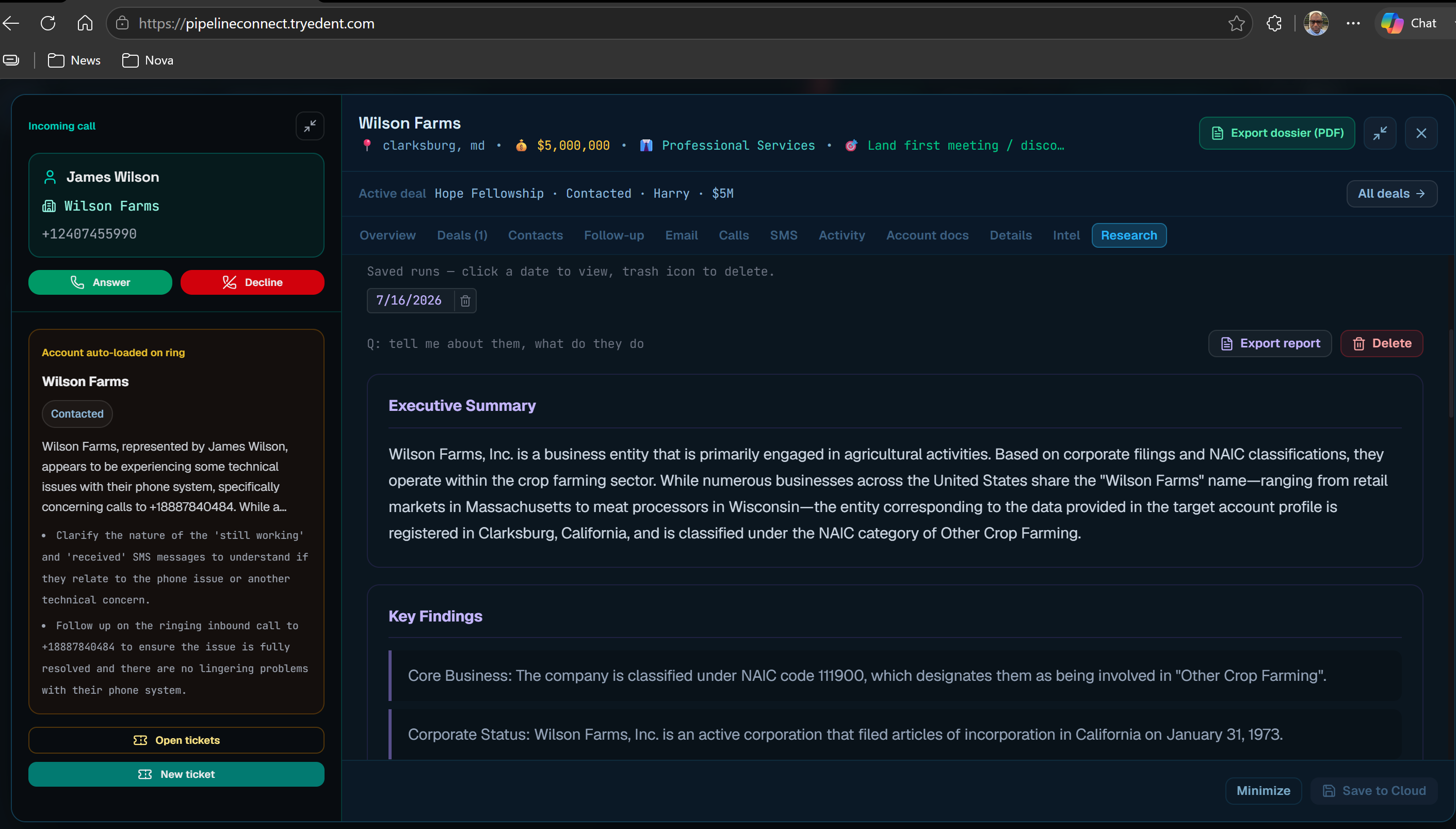
Caller ID opens the dossier, risk score, and latest AI briefing before the agent answers.

Contact center

Queues & IVR

Shared inbound numbers, ACD routing, hold music, and ticket queues tied to CRM accounts.

AI phone agents

Front door or co-pilot

Let AI answer routine calls — or assist live reps with briefings and coaching. You set the mix per queue.

Connect Ops

Live wallboard

Supervisors see queue depth, calls in flight, and agent status — reps stay in one workspace.

Where the industry is going

AI agents in the contact center — assist, automate, or both.

Most teams aren’t replacing every agent overnight. They’re using AI to absorb repetitive volume — status checks, FAQs, routing, after-hours — and keeping humans on complex, emotional, and high-value conversations. Connect is built for that model, not a rip-and-replace fantasy.

AI handles routine volume

Optional AI phone agents on your main number answer from your playbooks — hours, order status, billing FAQs, intent routing, overflow, and after-hours — without a press-1 phone tree.

AI assists your humans

When a person takes the call, they get screen-pop with dossier, risk, and live briefing — plus Signal coaching on screen during the conversation. The customer doesn’t hear it; your rep does.

You choose the mix

Turn AI on per queue. Warm-hand off to the right team with intent and CRM context captured. Scale agents up or down — same workspace, same account record.

See AI phone agent use cases →  ·  Find your team persona →

Your team

One platform — four workspace personas

Connect adapts to how your team works. Same CRM, channels, and AI intelligence underneath — different goals, navigation, and coaching for each persona.

Customer care Inbound support & contact center For teams that answer the phone — shared support lines, voice queues, IVR, agent Desktop, and SLA tickets. Every caller gets account context on screen-pop, not a blank CRM search.
  • Voice queues, hold music, overflow, and Connect Ops wallboard
  • AI phone agents for routine calls; humans for escalations with full context
  • Tickets, calls, email, and SMS on one account dossier
See customer care details ↓
Sales Outbound & pipeline calls For reps who live on the phone — outbound dial, click-to-call, and inbound callbacks with pipeline stage, pitch angles, and WHY NOW intel before they speak.
  • Dedicated Connect line per rep; dial from any contact
  • Screen-pop with deal stage and latest AI briefing
  • Live Signal coaching during the call (rep-only)
See sales details ↓
Customer success Renewals & health reviews For CS teams managing adoption and renewals — see at-risk scores, contract timing, and QBR-ready intel when customers call, email, or open a ticket.
  • At-risk register and health signals on every dossier
  • Shared inbox threads matched to accounts automatically
  • Post-call follow-ups and summaries via Signal
See customer success details ↓
Account management Growth on key accounts For strategic account owners — expansion goals, stakeholder gaps, and research briefings before executive calls. Voice, SMS, and email logged to the same portfolio record.
  • Portfolio view with intel tuned for account growth
  • Full conversation history across channels in Activity
  • Leadership reports and analytics for QBRs
See account management details ↓

Customer care

Contact center with account context on every interaction

Your classic inbound support motion — voice queues, IVR, agent Desktop, and SLA tickets — without agents juggling CRM tabs on hold.

  • Shared support DIDs route into queues with per-queue hold music and overflow
  • Optional AI agents on the front door; warm transfer to agents with intent captured
  • Screen-pop opens tickets, history, and AI briefing on the same dossier
  • Supervisors monitor queue health and AI activity in Connect Ops

Sales

Briefed before every dial

Outbound and inbound sales calls with pipeline context, pitch angles, and Signal coaching on screen — not a bolt-on dialer beside the CRM.

  • Click-to-dial from any contact with dedicated lines per rep
  • WHY NOW intel and stage on screen-pop for inbound callbacks
  • Live Signal coaching during the call (rep-only)

Customer success

Renewal and health context on every call

CS teams see at-risk scores, contract timing, and QBR-ready intel when customers call — email and tickets stay on the same account record.

  • At-risk register and health signals on the dossier
  • Shared inbox threads matched to accounts automatically
  • Post-call summaries and follow-ups via Signal

Account management

Strategic context for portfolio conversations

Account managers get expansion goals, stakeholder gaps, and research briefings before executive calls — voice, SMS, and email in one workspace.

  • Portfolio view with intel tuned for account growth
  • SMS and email threads logged to Activity on the dossier
  • Reports and analytics for leadership reviews
AI phone agents

Your AI front door — specialist playbooks per queue.

Deploy conversational AI on inbound lines to deflect routine calls or cover gaps when humans are busy. When the caller needs a person, Connect warm-transfers to your queue with dossier, history, and intent already on screen — not “please repeat your issue.”

FAQ & self-service

Answer hours, order status, and common questions from your instructions — no “press 1 for…” maze.

Route by intent

Sales, support, billing, or technical — the AI figures out the right queue and hands off naturally.

Warm handoff to humans

Complex, urgent, or emotional calls route to your team — not voicemail limbo. Context travels with the call.

Greet by name

Known CRM contacts hear their first name when they call. Unknown numbers get a warm generic greeting — never guessed.

After-hours & overflow

Keep answering when the team is away or lines are busy — hold, help, or route on your terms.

Specialist playbooks

Each queue gets its own AI instructions — FAQ team, technical support, renewals, and more.

1

Caller dials your main number

One natural greeting — the AI listens for intent instead of forcing a phone-tree menu.

2

AI resolves or routes

Routine requests handled from your playbook. The right specialist queue when a human should take over.

3

Human picks up with context

Screen-pop, dossier, and call history — your rep continues the conversation without asking the customer to repeat.

pipelineintelligence.io
Workspace shared inbox with threads matched to CRM accounts
Platform

Every channel on the same account record.

Voice, email, SMS, and tickets tie back to one CRM dossier — so agents and supervisors never lose context across tabs or tools.

Browser softphone

No PBX or desk phones required. Inbound and outbound calls run in the browser. Caller ID matches a CRM account — the dossier opens before you answer, with optional live Signal coaching during the call.

Workspace shared inbox

Connect your team's work mailbox once. Incoming threads route to the right account — every send logs to Activity.

Ticket & voice queues

Support queues linked to CRM accounts, plus shared inbound numbers with ACD routing — and optional AI phone agents that resolve from your playbooks and warm-hand off to humans when needed.

SMS from the dossier

Text customers from the rep's Connect line. Threads attach to the account record alongside calls and email.

Connect Ops wallboard

Managers get a dedicated ops view: live calls map, voice queue depth, agent status, call logs, and usage reporting.

Full Intelligence included

Live AI briefings, Signal copilot grounded in per-account CRM, analytics hub, at-risk scoring, reports, and calendar ship with Connect.

How a call works

Briefed before you say hello.

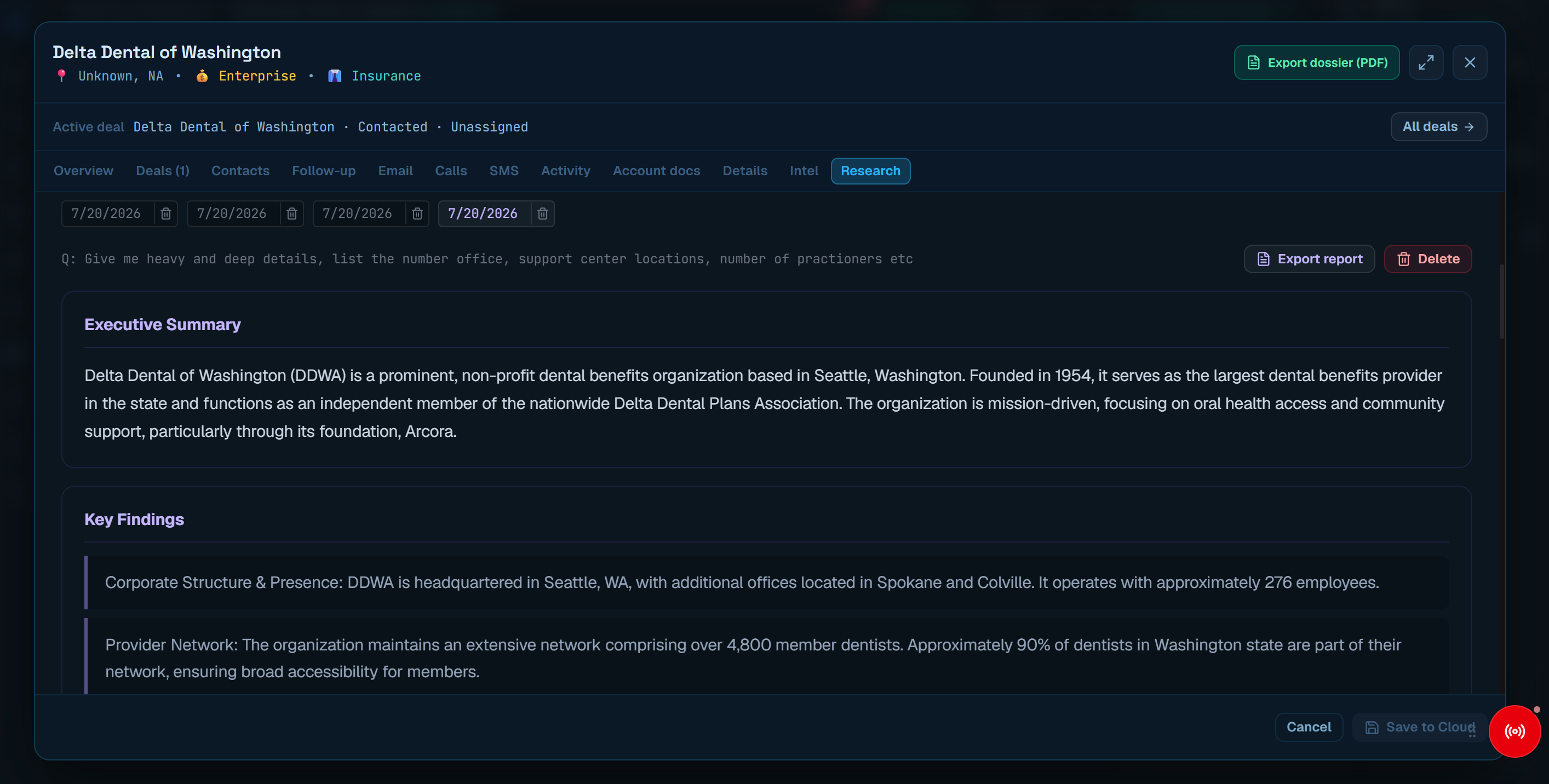
When a known customer calls, your agent sees the full story — not a blank screen and three tabs to open.

pipelineintelligence.io
Research briefing on the account dossier — executive summary loads before the rep answers
1

Call rings in browser

No phone system to install — inbound to the rep's Connect line. Softphone accepts in the browser, no desk phones or separate app.

2

Account matched instantly

Caller ID resolves to a CRM account. Dossier, risk score, and last intel briefing load automatically.

3

Live Signal coaching

Short coaching tips stream on the rep’s screen during the call — grounded in live transcript and CRM context. Only the rep sees them; the customer never hears it.

Why teams switch

Replace the patchwork — keep the context.

Most contact centers run a dialer, a CRM, a ticketing tool, and a separate AI add-on. Connect is one workspace with intelligence built into the account record.

Instead of CRM + dialer

Browser softphone, click-to-dial, and screen-pop on the same dossier your managers already use for pipeline and accounts.

Instead of tickets in another tab

Voice queues, SLA tickets, shared inbox, and SMS threads all attach to the CRM account — one history for every channel.

Instead of generic AI chat

Live briefings, at-risk scoring, and Signal coaching grounded in your workspace data — not a blank ChatGPT window.

Connect pricing

Voice minutes included.
CRM and intel included.

Connect plans include the full Pipeline Intelligence platform. Voice and SMS allowances are per seat; intel uses the same shared workspace pool as standard plans.

Connect Voice

$99

per seat / month

  • Full CRM + tickets + browser voice
  • 2,000 voice min / seat / month
  • 2,000 SMS segments / seat / month
  • Dedicated line per rep + shared inbox, Signal & analytics
Contact sales

Connect Scale

$199

per seat / month

  • Everything in Connect Team
  • 10,000 voice min / seat / month
  • 10,000 SMS segments / seat / month
Contact sales

Enterprise

Custom

25+ seats · annual invoicing

  • High-volume phone teams
  • Custom voice minute pools
  • SLA & dedicated support
Contact sales
Add-ons

Optional capabilities on any Connect plan

AI phone agents

$0.20/ min

Conversational AI on your main number — FAQ, routing, after-hours, and warm handoff to humans with CRM context. Billed per minute of AI conversation time; human agent minutes use your plan pool.

  • Specialist playbooks per queue (sales, support, FAQ, account)
  • Greet known callers by name from your CRM
  • Warm transfer with intent and dossier on screen-pop
Contact sales to add

Connect is a paid product — no self-serve free trial. New phone teams: contact sales.
Need CRM-only (no phone)? Book a demo.

Connect FAQ

Common Connect questions

How is Connect different from Pipeline Intelligence?

Connect is a separate product that includes everything in Pipeline Intelligence plus browser voice, SMS, ticket queues, workspace shared inbox, and Connect Ops.

Do we need on-prem phone infrastructure?

No. Connect needs no heavy infrastructure — no PBX, SIP trunks, desk phones, or on-prem hardware. Reps use a browser softphone.

What email providers work for shared inbox?

Any work mailbox your team uses — Google, Microsoft, IMAP, Yahoo, iCloud, or custom SMTP hosts. Connect is provider-agnostic.

What is Connect Ops?

A manager-facing ops surface with live calls map, agent line provisioning, call logs, and usage reporting.

Are intel runs included?

Yes. Connect includes the full Intelligence platform, drawing from the same shared monthly pool as standard plans.

Can AI replace our contact center agents?

You decide. Most customers start with AI on routine traffic — FAQs, hours, status, routing, after-hours — and keep humans on complex or sensitive calls. Connect supports full AI handling, human-only queues, or a blend with warm handoff and screen-pop context. Nothing forces a rip-and-replace.

How much do AI phone agents cost?

AI phone agents are an optional metered add-on at $0.20 per minute of AI conversation time on any Connect plan. Human agent voice minutes still draw from your seat allowance. See add-ons or contact sales to enable.

What are AI phone agents?

Optional conversational AI on your main number — it solves routine calls from your specialist playbooks (FAQ, support, routing) and routes to a human when the caller needs a person, with CRM context on handoff.

What is live coaching?

While a rep is on a live call, Signal streams short coaching hints on their screen — grounded in the live transcript and account record. It’s rep-only; the customer never hears it.

Which workspace persona should we use?

Admins pick a workspace persona at setup — Sales, Customer success, Account management, or Customer care (contact center). It adjusts navigation, account goals, and AI framing. You can change it later in workspace settings.

Is Connect a contact center or a CRM?

Both. Connect is a full CRM with intelligence plus browser voice, queues, IVR, tickets, and supervisor ops. Customer care teams use queues and Desktop; sales teams lean on outbound dial and pipeline views — same platform.

Can we try Connect before committing?

Connect has no self-serve free trial. Talk to sales for onboarding and a pilot, or book a CRM-only demo first.

“Whether your team is inbound support, outbound sales, or managing renewals — every call should start with the account story already on screen. That’s what Connect is built for.”

One workspace for customer care, sales, success, and account management teams.

Ready to put context on every call?

Tell us your team type, agent count, and current stack — we’ll map Connect to your queues, personas, and go-live plan.

Connect with Us